TLS-encrypted message transfer
The syslog-ng OSE application can send and receive log messages securely over the network using the Transport Layer Security (TLS) protocol using the network() and syslog() drivers.
Secure logging using TLS
This chapter describes how to use TLS encryption when using the standard syslog protocols, that is, the network() and syslog() drivers, for example, to forward log messages between two syslog-ng OSE nodes, or to send log data to syslog-ng OSE Store Box or another log server. Other destinations that support TLS-encryption are not discussed in this chapter (for example, http())).
TLS uses certificates to authenticate and encrypt the communication, as illustrated on the following figure:
Figure 19: Certificate-based authentication
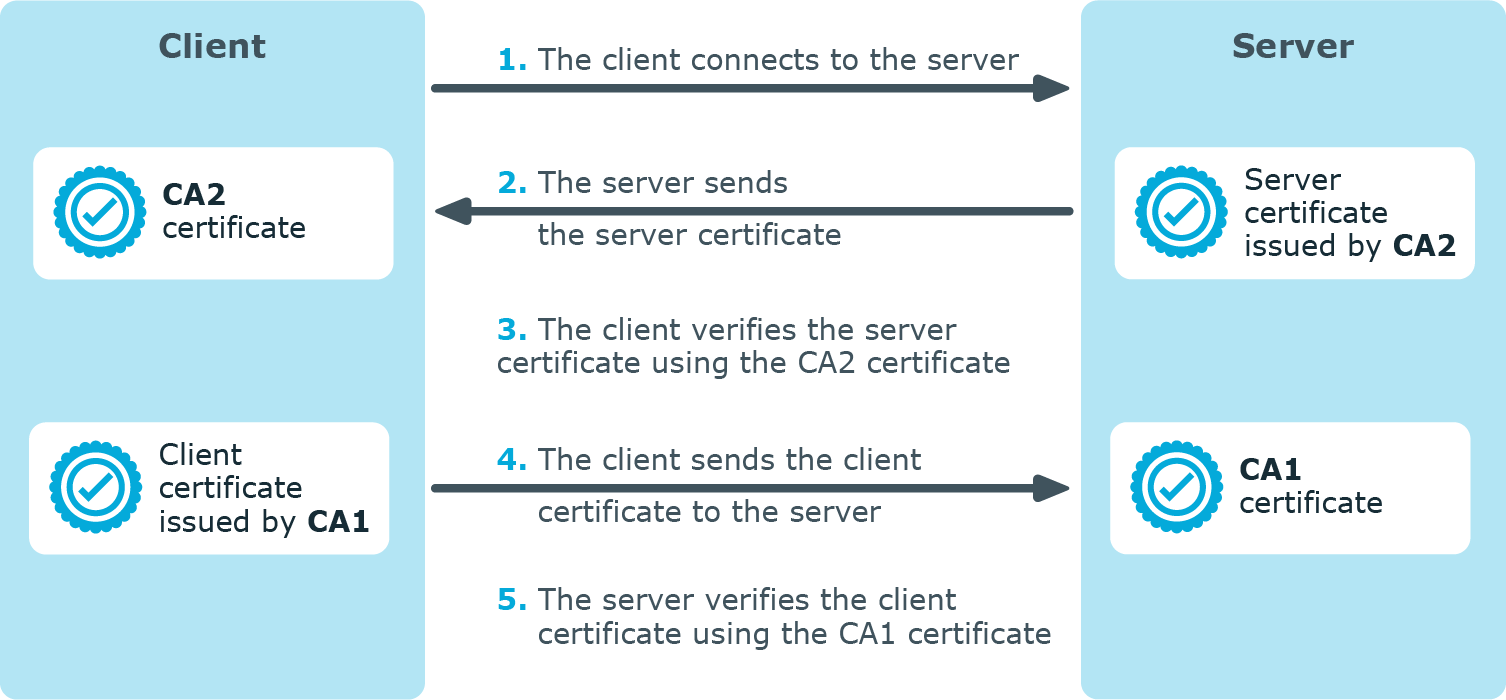
The client authenticates the server by requesting its certificate and public key. Optionally, the server can also request a certificate from the client, thus mutual authentication is also possible.
In order to use TLS encryption in syslog-ng OSE, the following elements are required:
-
A certificate on the syslog-ng OSE server that identifies the syslog-ng server.
-
The certificate of the Certificate Authority that issued the certificate of the syslog-ng OSE server (or the self-signed certificate of the syslog-ng OSE server) must be available on the syslog-ng OSE client.
When using mutual authentication to verify the identity of the clients, the following elements are required:
-
A certificate must be available on the syslog-ng OSE client. This certificate identifies the syslog-ng OSE client.
-
The certificate of the Certificate Authority that issued the certificate of the syslog-ng OSE client must be available on the syslog-ng OSE server.
Mutual authentication ensures that the syslog-ng OSE server accepts log messages only from authorized clients.
For more information about configuring TLS communication in syslog-ng OSE, see Encrypting log messages with TLS. For more information about TLS-related error messages, see Error messages.